AI Content Assistant
Social Media Tool

5 months

2025
TL;DR
- Project Type: Mobile-first Social Media Management & AI Content Tool
- My Role: Product Designer (research, UX, UI, end-to-end)
- Problem: Creators and publishers struggled with time-consuming scheduling, fragmented tools, and complex workflows.
- Solution: Designed a clean, AI-powered mobile experience that unifies content generation, scheduling, and analytics in one app.
- Key Impact: Simplified social media workflows and reduced cognitive load by replacing multi-tool processes with a single intuitive platform.
- Tools & Methods: User interviews, competitive analysis, personas, user flows, wireframes, UI design, Figma.
Overview
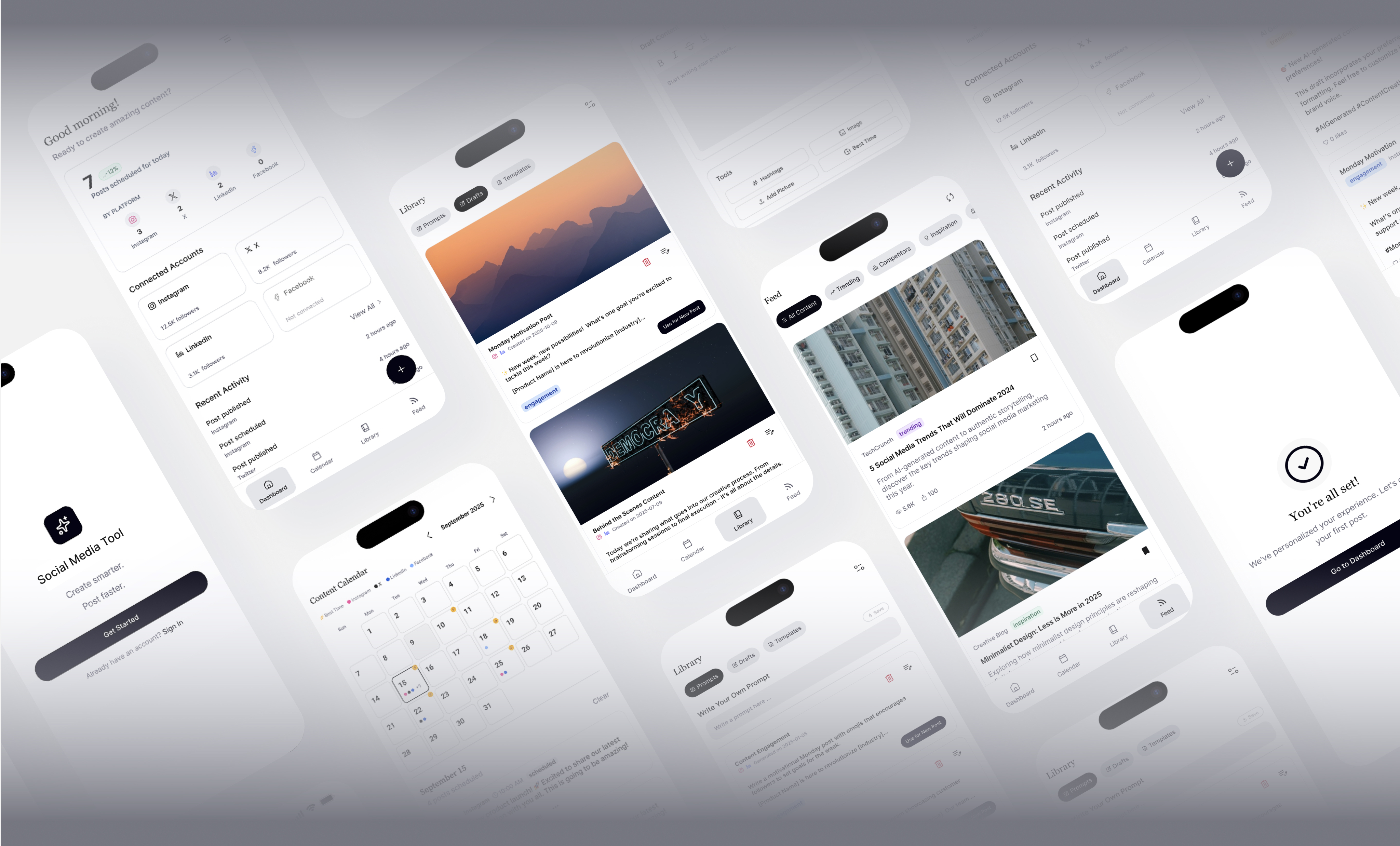
Social Media Tool is a mobile-first platform that helps creators manage and generate social media content effortlessly. The goal was to build an interface that combines AI-assisted creativity with seamless social media management allowing users to generate, schedule, and track content in one elegant, minimal app. The design transformed a complex prototype into a clean, intuitive experience powered by AI creativity and smart scheduling.
Design Process
1
User Research & Discovery
Conducted interviews with solo creators, small business owners, and content managers to understand real workflows, pain points, and motivations. Analyzed competitor tools to identify gaps in usability, onboarding, and content planning.
2
Information Architecture
Redefined the structure around the user’s natural workflow:
Idea → Creation →Review → SchedulingReduced unnecessary features and surfaced only the most essential actions at each step to minimize cognitive load.
3
Visual Design & Prototyping
Created high-fidelity prototypes with friendly visual language, clear typography, and lightweight micro-interactions to support focus.
4
Testing & Iteration
Ran moderated usability tests with 15 participants. Iterated based on feedback to improve task completion and satisfaction scores.
The Problem
“I know what I want to post, but actually getting content out consistently feels overwhelming.”
- User interview participant
Through early research, it became clear that users struggled not with creativity itself, but with process friction. Planning, writing, scheduling, and tracking content across multiple platforms felt disjointed and stressful, leading to inconsistency and burnout.
Key challenges included:
- Too many steps between idea and published post
- Lack of guidance or structure when planning content
- Poor visibility into what’s working and what’s not
Discovery & Research
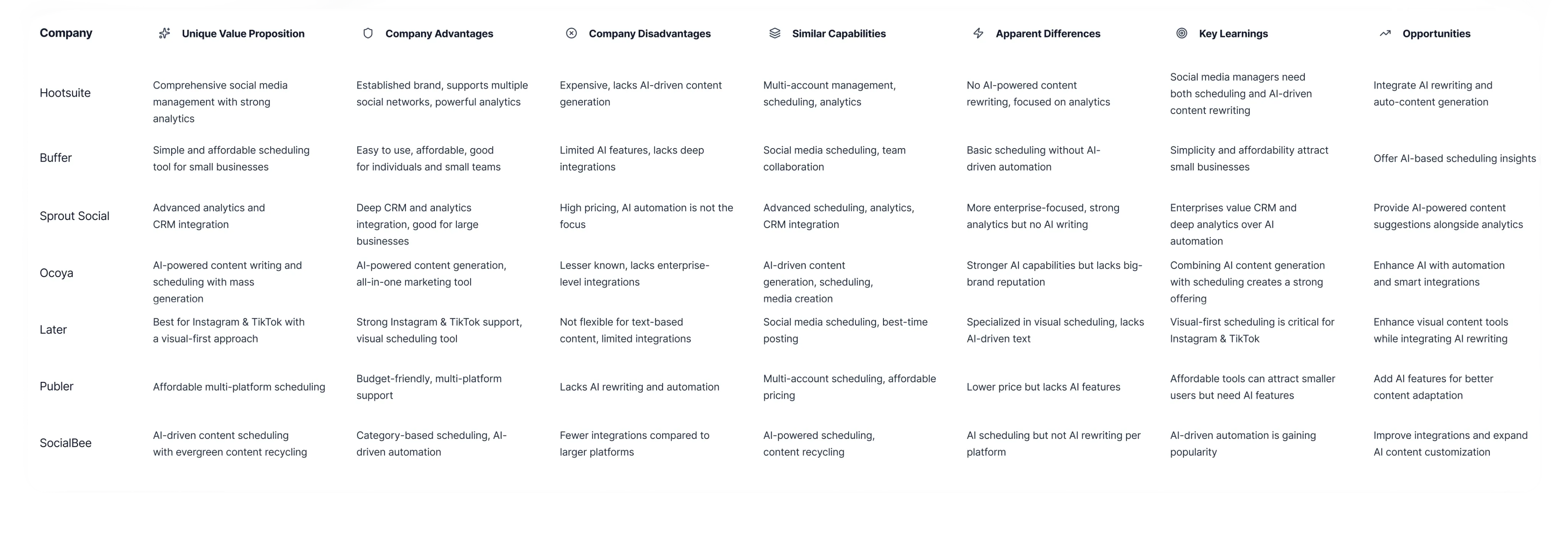
I began with in-depth user research to understand how solo creators and news curators manage their social media presence. Through interviews and workflow analysis, I uncovered recurring pain points around time-consuming scheduling and the complexity of existing tools. A competitive analysis revealed clear opportunities to improve AI integration, automation, and mobile usability.
Research Insights
73%
of users said content planning felt more stressful than content creation itself
93%
wanted help turning ideas into ready-to-post content faster
87%
preferred simple visual dashboards over dense analytics tables
These insights reinforced the need for a tool that prioritizes clarity, flow, and gentle guidance rather than advanced but overwhelming features.
Solution: Key Features
1. AI-Assisted Content Creation
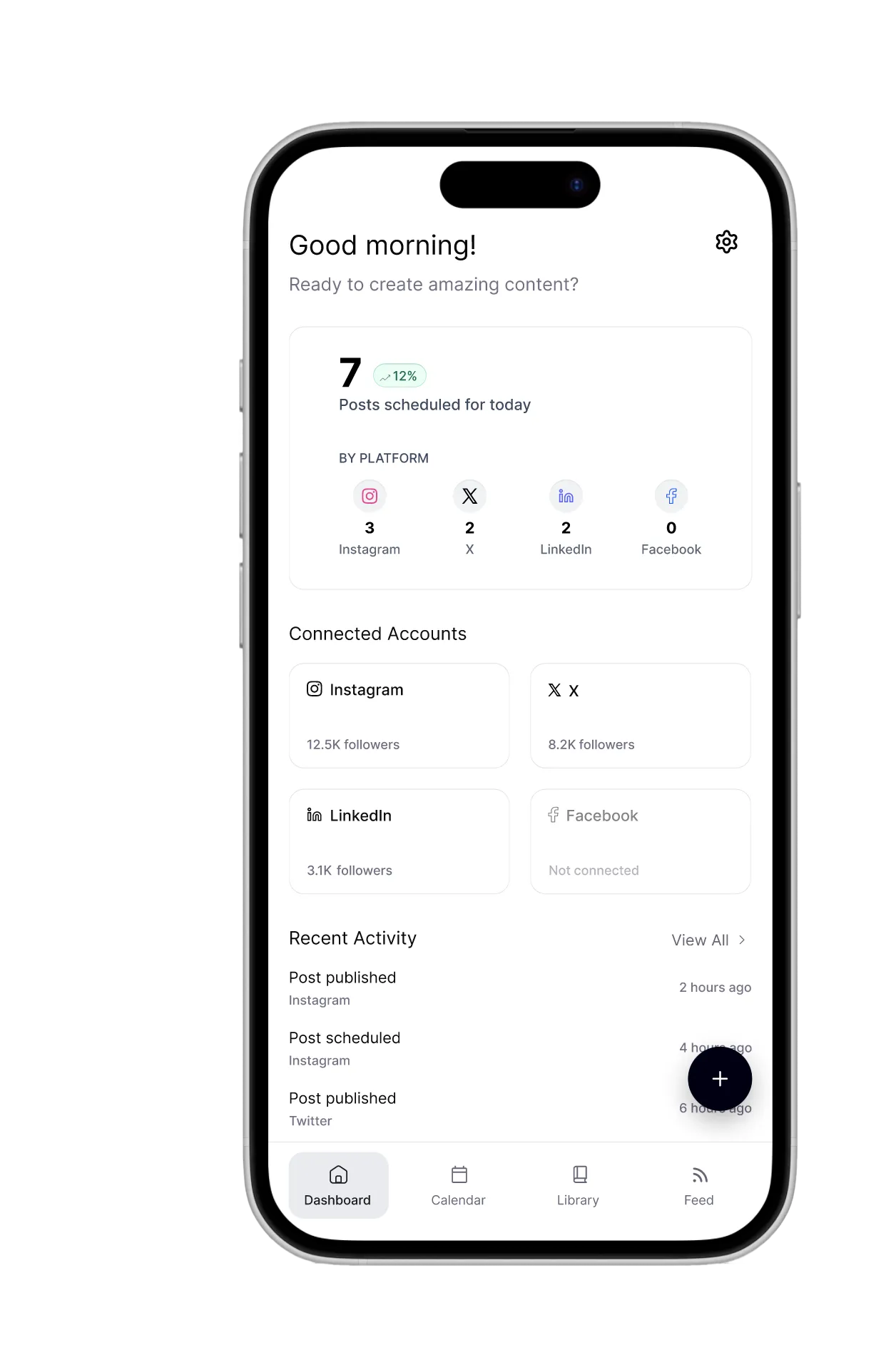
A guided content creation flow that helps users move from idea to post quickly. Users can generate captions, refine tone, and adapt content for different platforms while maintaining full control over the final output.
2. Centralized Content Planner
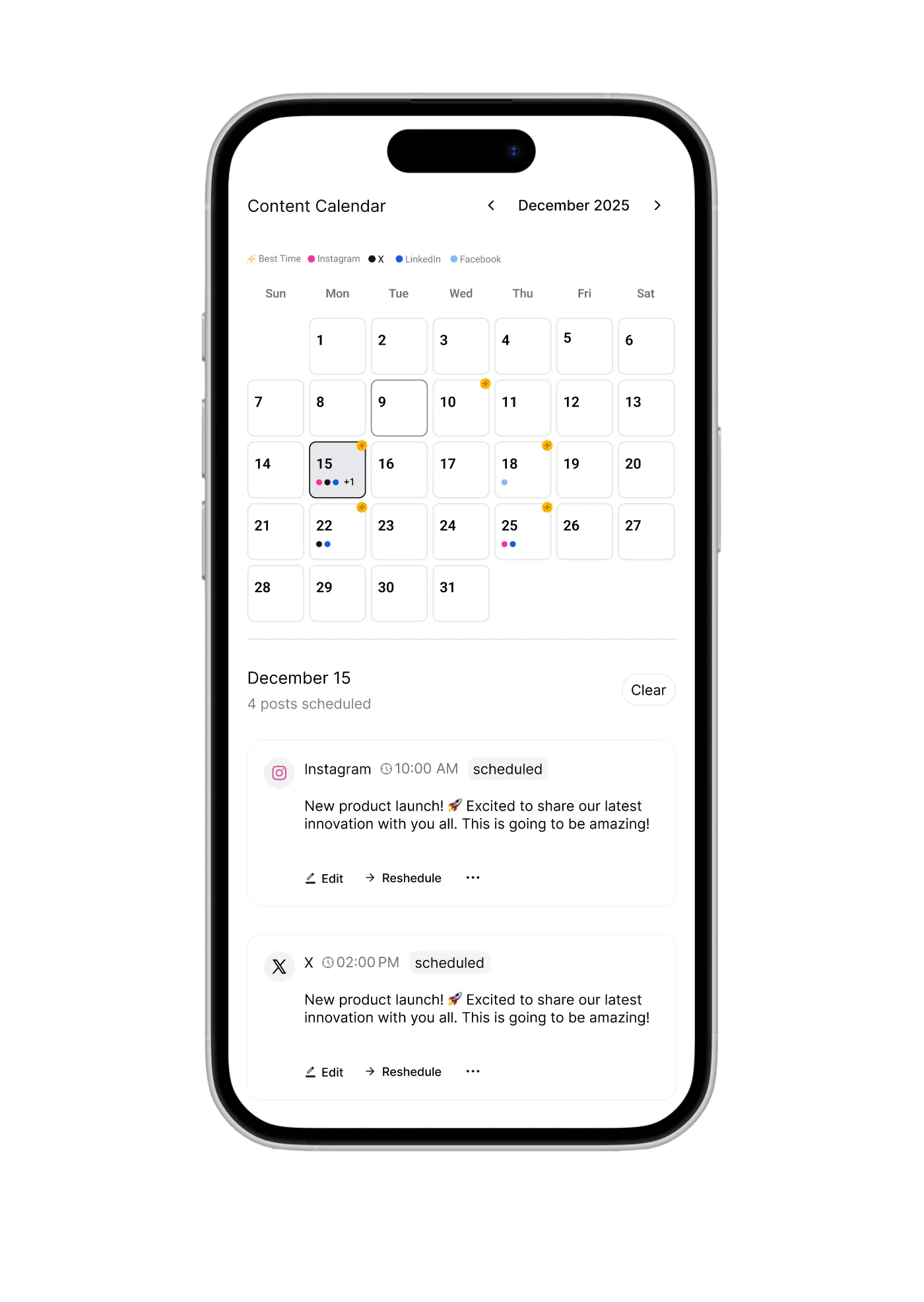
AI-powered calendar with best-time suggestions that brings planning and scheduling into one place. Users can easily see what’s scheduled, spot content gaps, and adjust posts without navigating through complex menu.
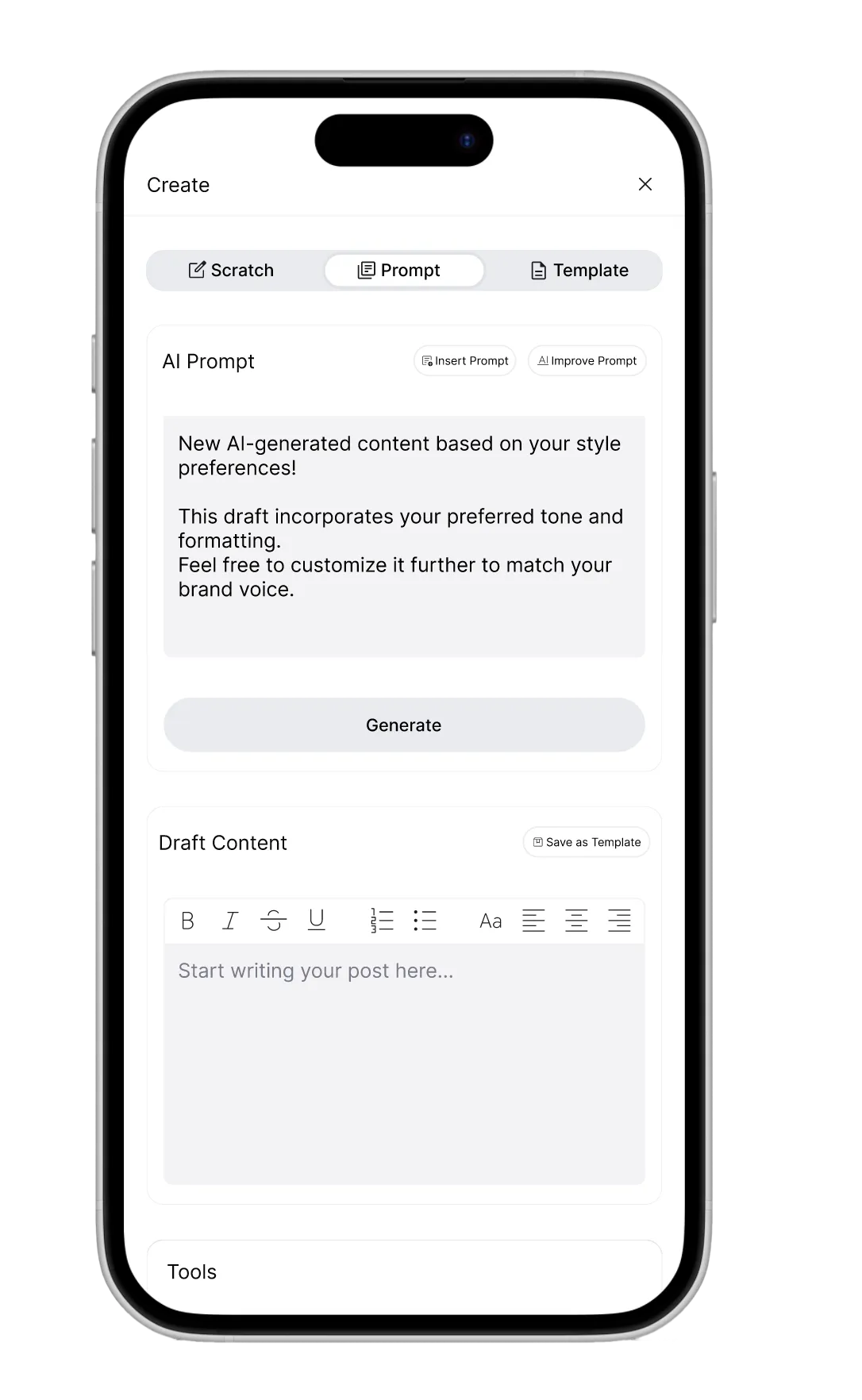
3. Smart Post Editor
A streamlined post editor with built-in templates and image generation helps users turn ideas into polished posts faster. The editor balances guidance and flexibility, allowing users to customize content while reducing repetitive work.
To Be Continued...
This project is currently in the development phase, with core features actively being tested and refined. As the platform evolves, new updates, visuals, and insights will be added to reflect the latest progress. Stay tuned — more behind-the-scenes details and design iterations will be shared soon.
Get in Touch
olga.simonovapro@gmail.com
Social
LinkedIn →
© 2026 Olga Simonova


AI Content Assistant
Social Media Tool
5 months
2025
TL;DR
- Project Type: Mobile-first Social Media Management & AI Content Tool
- My Role: Product Designer (research, UX, UI, end-to-end)
- Problem: Creators and publishers struggled with time-consuming scheduling, fragmented tools, and complex workflows.
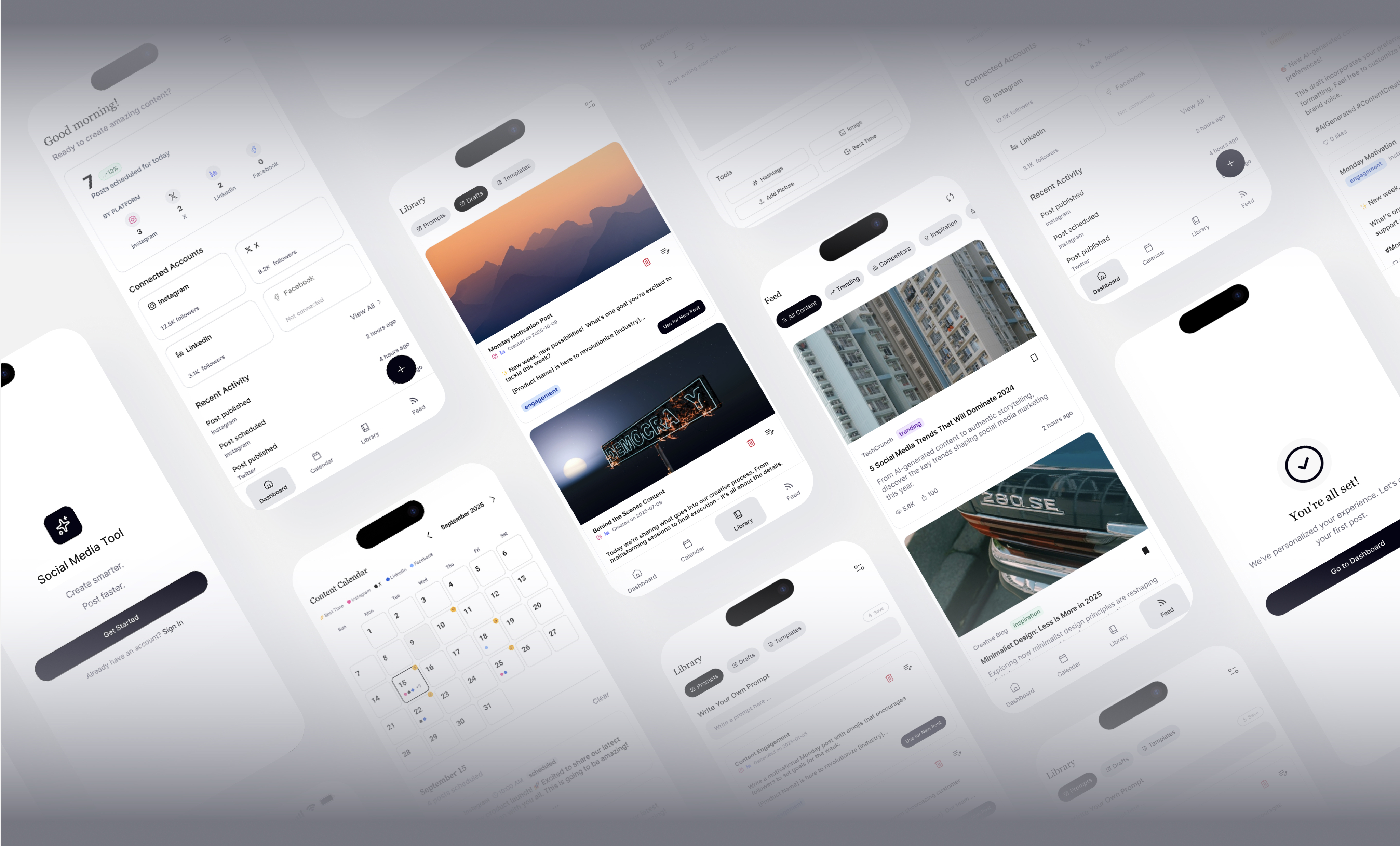
- Solution: Designed a clean, AI-powered mobile experience that unifies content generation, scheduling, and analytics in one app.
- Key Impact: Simplified social media workflows and reduced cognitive load by replacing multi-tool processes with a single intuitive platform.
- Tools & Methods: User interviews, competitive analysis, personas, user flows, wireframes, UI design, Figma.
Overview
Social Media Tool is a mobile-first platform that helps creators manage and generate social media content effortlessly. The goal was to build an interface that combines AI-assisted creativity with seamless social media management allowing users to generate, schedule, and track content in one elegant, minimal app. The design transformed a complex prototype into a clean, intuitive experience powered by AI creativity and smart scheduling.
Design Process
1
User Research & Discovery
Conducted interviews with solo creators, small business owners, and content managers to understand real workflows, pain points, and motivations. Analyzed competitor tools to identify gaps in usability, onboarding, and content planning.
2
Information Architecture
Redefined the structure around the user’s natural workflow:
- Idea → Creation →Review → SchedulingReduced unnecessary features and surfaced only the most essential actions at each step to minimize cognitive load.
3
Visual Design & Prototyping
Created high-fidelity prototypes with friendly visual language, clear typography, and lightweight micro-interactions to support focus.
4
Testing & Iteration
Ran moderated usability tests with 15 participants. Iterated based on feedback to improve task completion and satisfaction scores.
The Problem
“I know what I want to post, but actually getting content out consistently feels overwhelming.”
-User interview participant
Through early research, it became clear that users struggled not with creativity itself, but with process friction. Planning, writing, scheduling, and tracking content across multiple platforms felt disjointed and stressful, leading to inconsistency and burnout.
Key challenges included:
- Too many steps between idea and published post
- Lack of guidance or structure when planning content
- Poor visibility into what’s working and what’s not
Discovery & Research
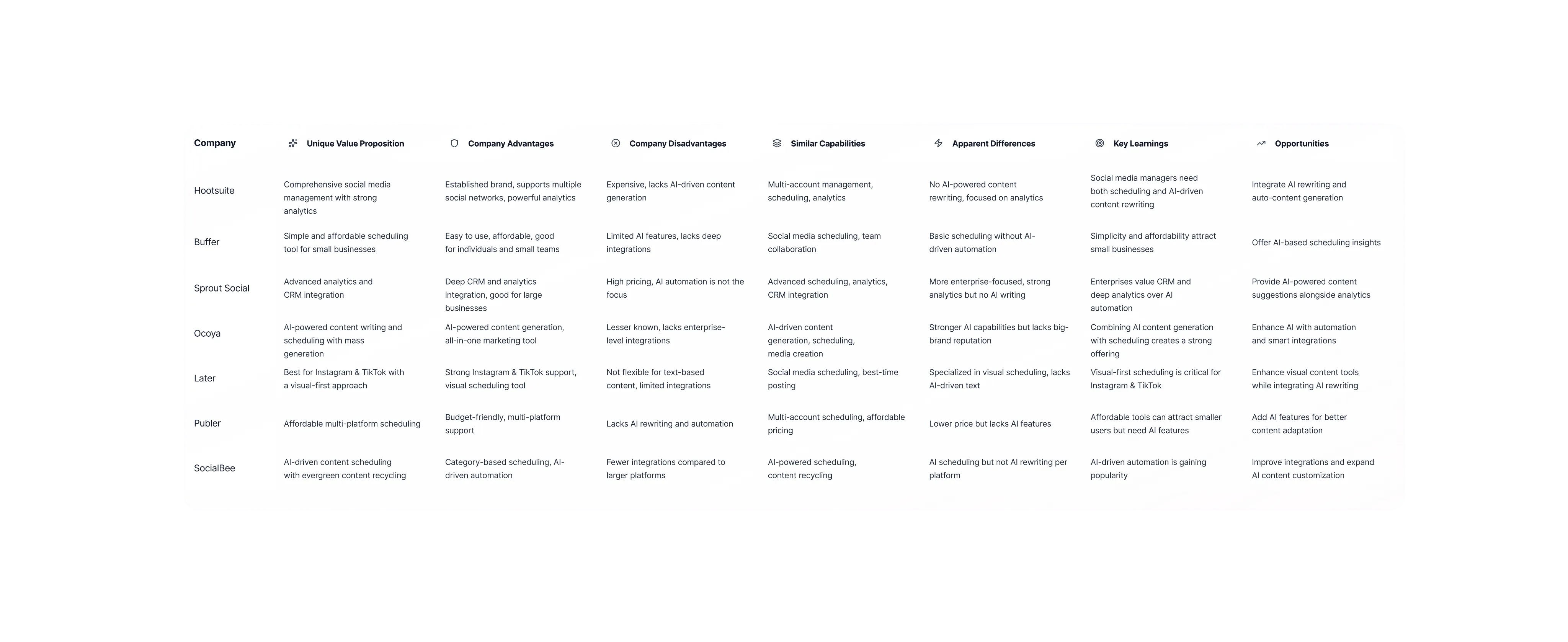
I began with in-depth user research to understand how solo creators and news curators manage their social media presence. Through interviews and workflow analysis, I uncovered recurring pain points around time-consuming scheduling and the complexity of existing tools. A competitive analysis revealed clear opportunities to improve AI integration, automation, and mobile usability.
Research Insights
73%
of users said content planning felt more stressful than content creation itself
93%
wanted help turning ideas into ready-to-post content faster
87%
preferred simple visual dashboards over dense analytics tables
These insights reinforced the need for a tool that prioritizes clarity, flow, and gentle guidance rather than advanced but overwhelming features.
Solution: Key Features
1. AI-Assisted Content Creation
A guided content creation flow that helps users move from idea to post quickly. Users can generate captions, refine tone, and adapt content for different platforms while maintaining full control over the final output.
2. Centralized Content Planner
AI-powered calendar with best-time suggestions that brings planning and scheduling into one place. Users can easily see what’s scheduled, spot content gaps, and adjust posts without navigating through complex menu.
3. Smart Post Editor
A streamlined post editor with built-in templates and image generation helps users turn ideas into polished posts faster. The editor balances guidance and flexibility, allowing users to customize content while reducing repetitive work.
To Be Continued...
This project is currently in the development phase, with core features actively being tested and refined. As the platform evolves, new updates, visuals, and insights will be added to reflect the latest progress. Stay tuned — more behind-the-scenes details and design iterations will be shared soon.
© 2026 Olga Simonova. All rights reserved.


olga.simonovapro@gmail.com
Social
LinkedIn →
Get in Touch