Web Platform
Dashboard UX Case Study

4 months

2025
TL;DR
- Project Type: Web-based Admin Dashboard for a News & Media Platform
- My Role: Product Designer (research, UX, UI, end-to-end)
- Problem: Editors and administrators lacked a clear, efficient way to manage large volumes of multilingual news content, categories, and publishing workflows, leading to manual work, errors, and low visibility into the content lifecycle.
- Solution: Designed a structured, scalable dashboard that centralizes article management, categories, moderation, and publishing controls, enabling fast, confident editorial decision-making.
- Key Impact: Reduced editorial friction, improved content organization, and supported consistent publishing at scale through clear information hierarchy and task-focused UI.
- Tools & Methods: User and stakeholder interviews, workflow analysis, information architecture, user flows, wireframes, UI design, design system, Figma.
Overview
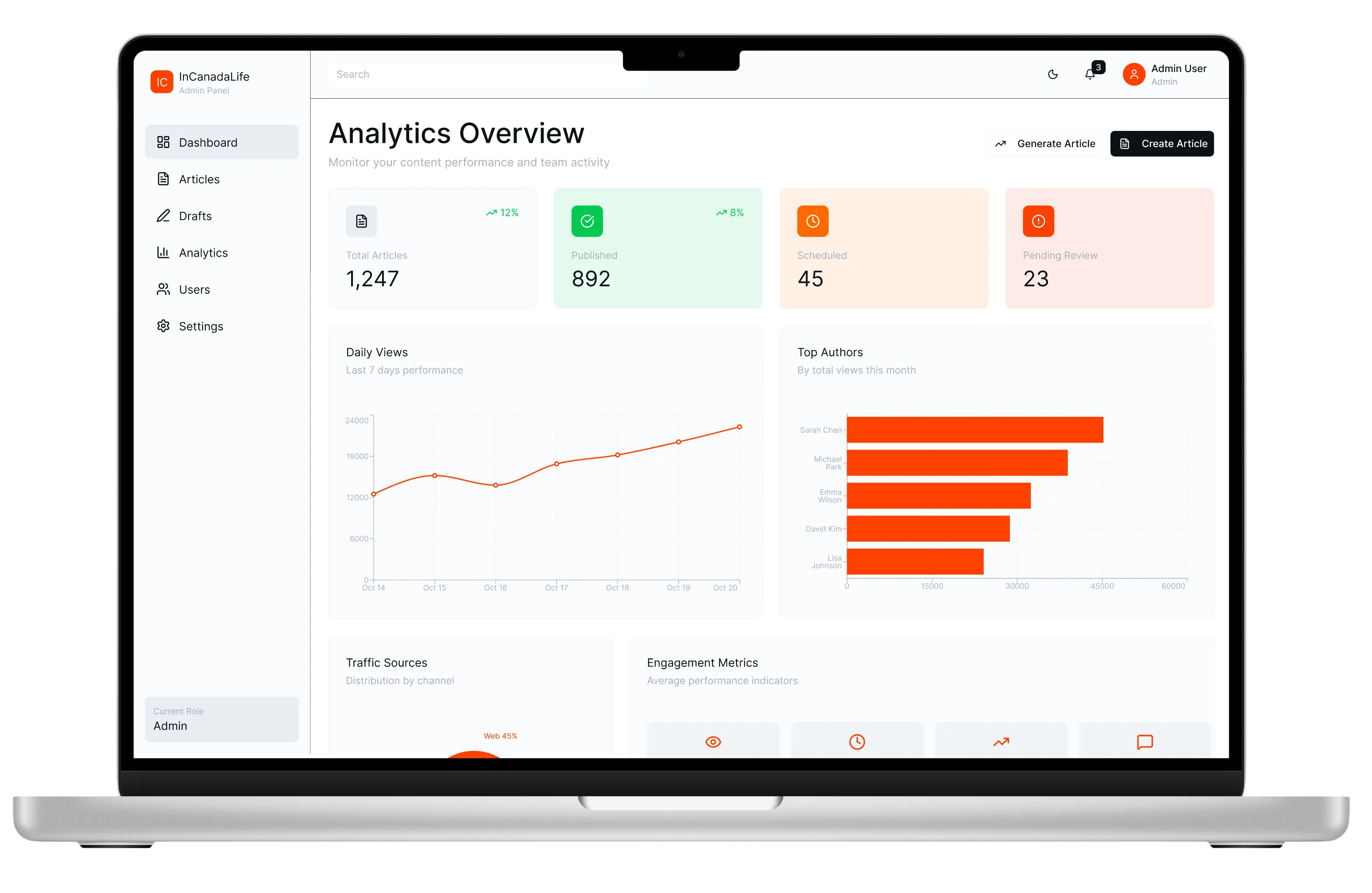
The InCanadaLife Admin Dashboard was designed as an internal platform to help editors manage articles, streamline publishing, and monitor performance in real time.The goal was to create a clean, intuitive interface that simplifies daily editorial tasks, visualizes key engagement metrics — all within a consistent design system shared with the main news website.
The Problem
As the platform scaled, editorial teams were slowed down by fragmented workflows, manual processes, and limited visibility into the content lifecycle. This made it difficult to publish efficiently, maintain quality, and support multilingual content at scale.
Key challenges included:
- Disconnected tools and manual workflows increasing errors and overhead
- Lack of clear article status, ownership, and publishing visibility
- Difficulty scaling content operations
Discovery & Research
Interviewed editors and contributors to identify pain points in publishing workflow.
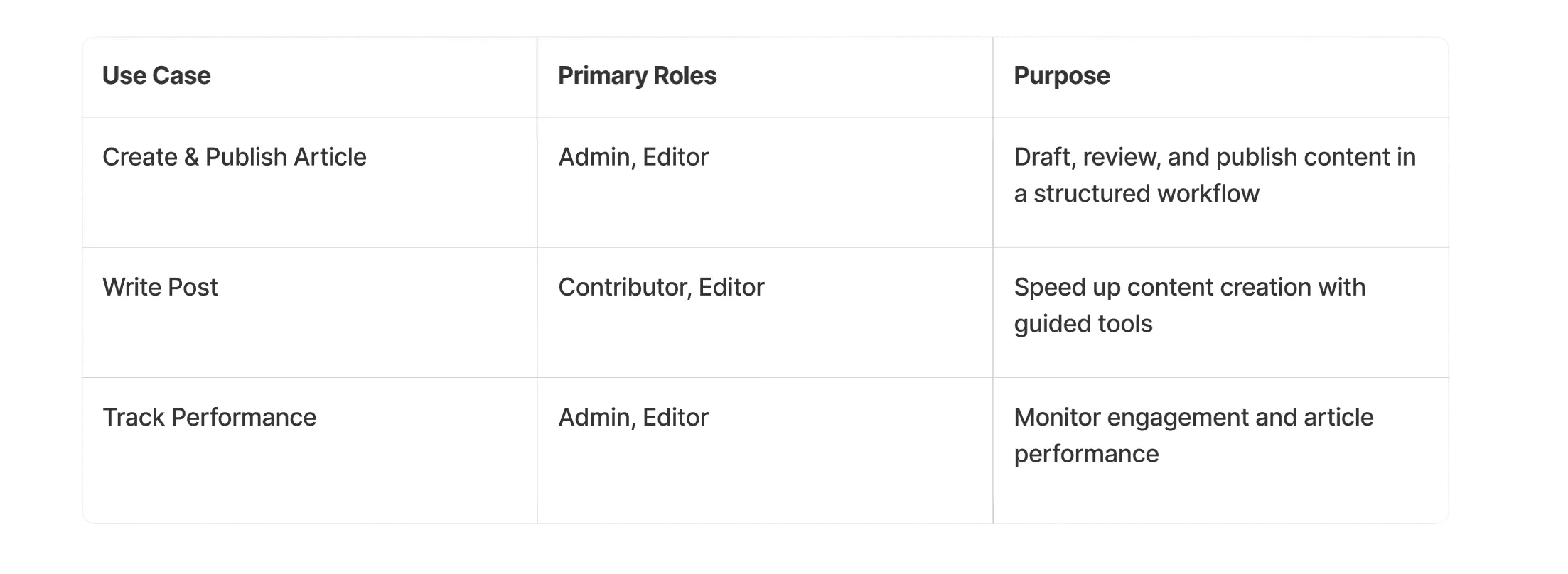
Defined use cases: “Create & Publish Article”, “Generate Post”, “Track Performance”.
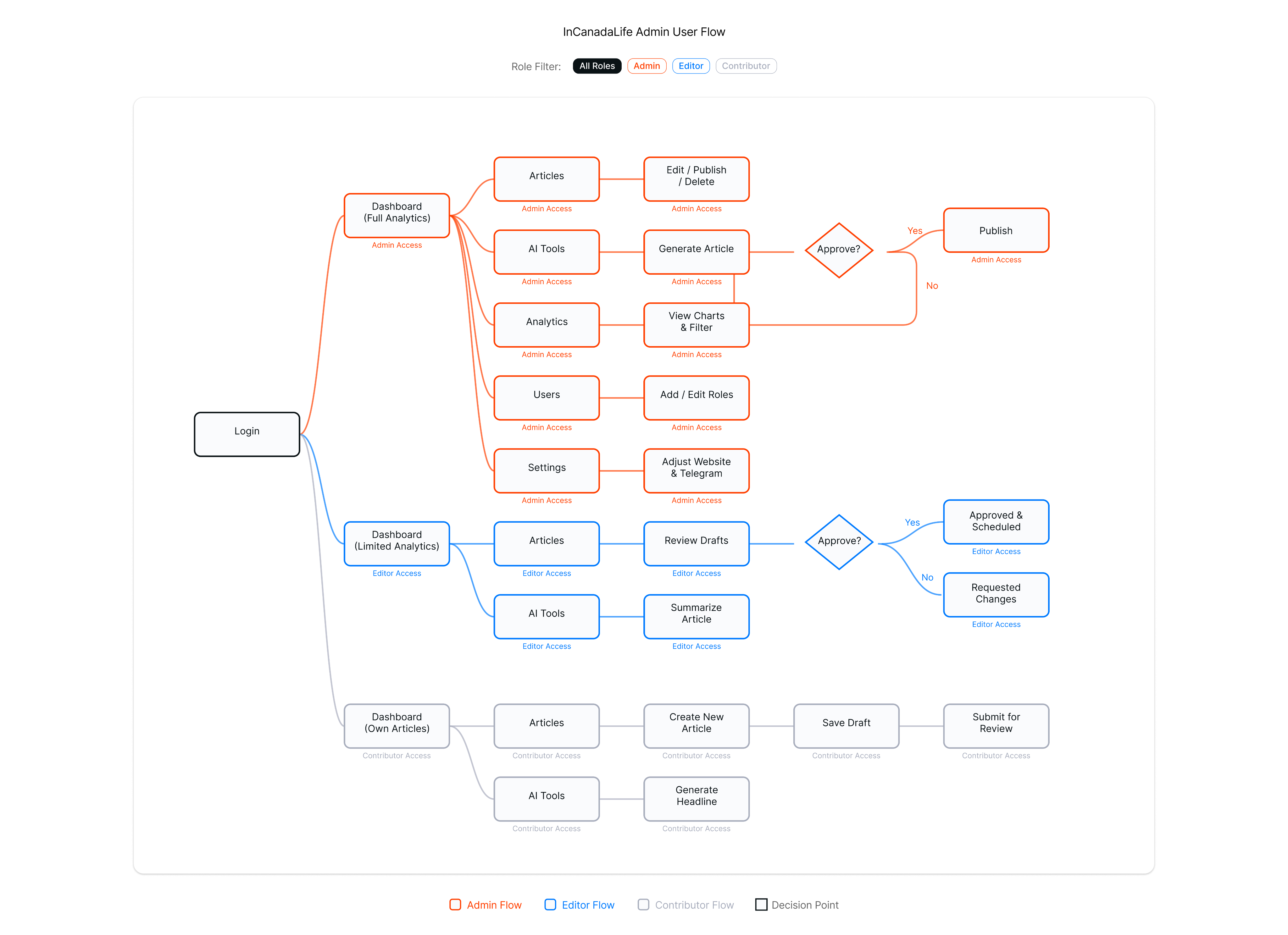
Based on the research insights, a clear user flow was designed to map how Admins, Editors, and Contributors move through the InCanadaLife Admin Dashboard—from content creation and review to publishing and performance tracking, ensuring an efficient, transparent, and role-based workflow.
Solution: Key Features
1. Role-Based Content Management
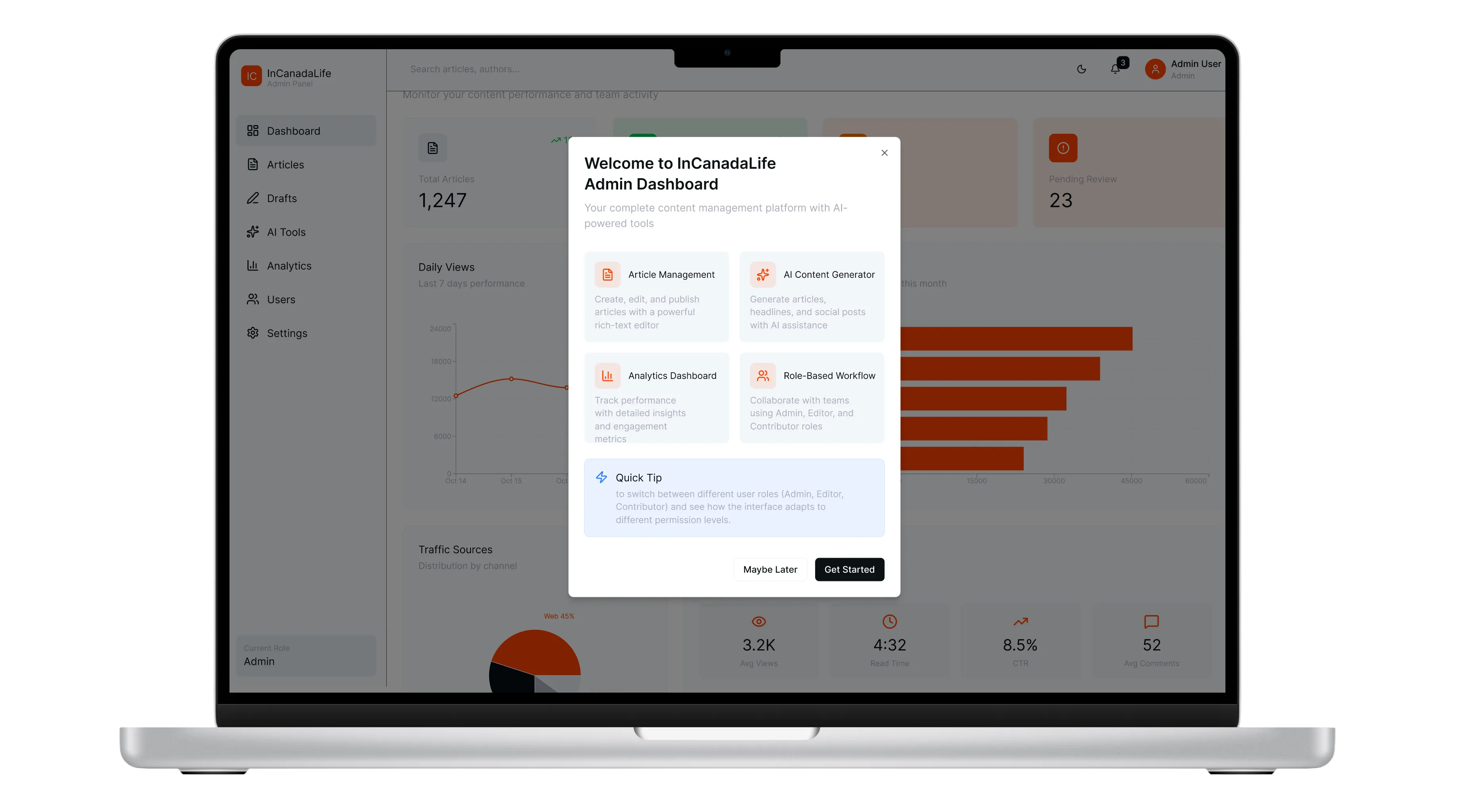
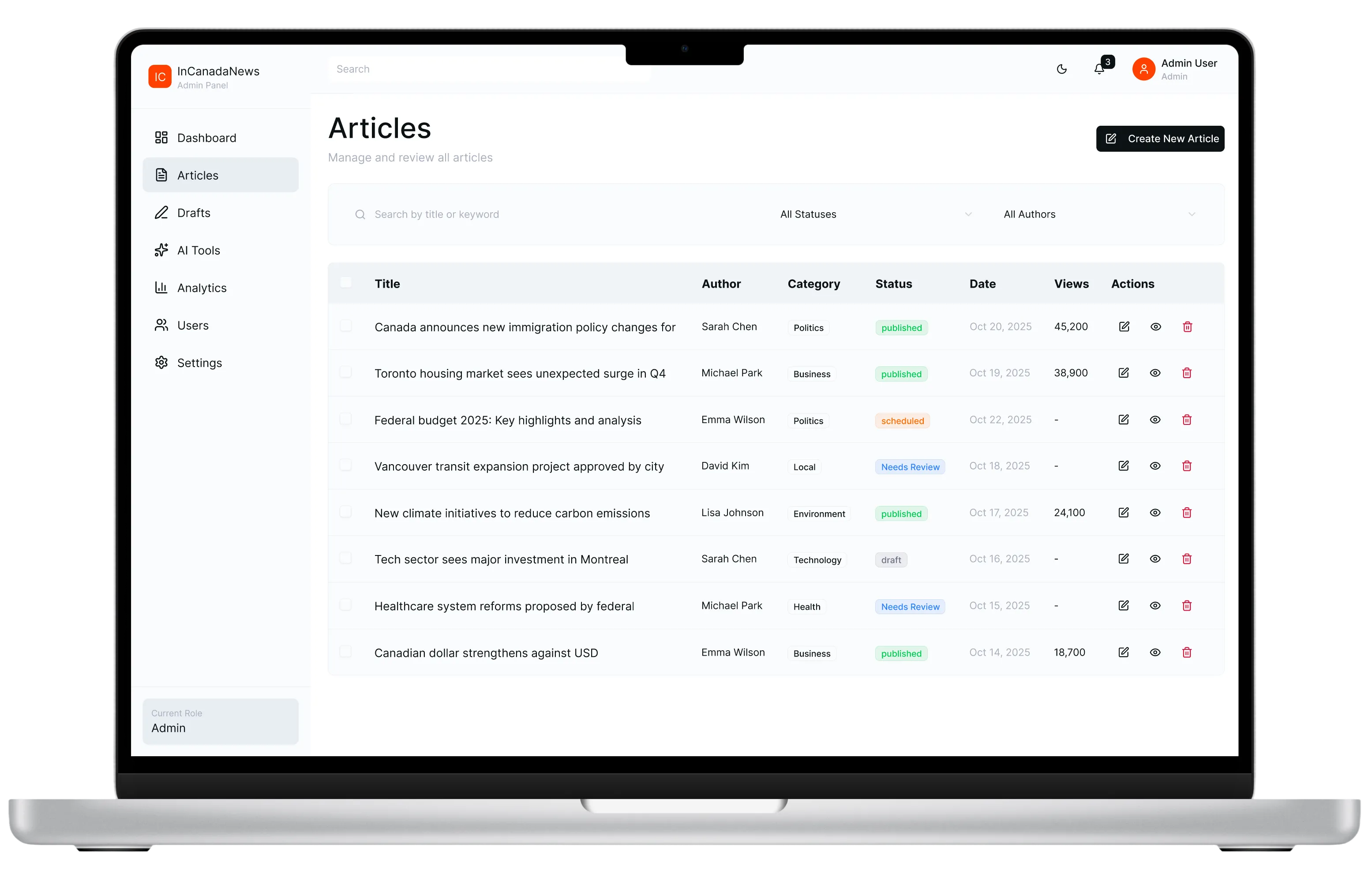
A clean, structured dashboard tailored to Admins, Editors, and Contributors, enabling efficient creation, editing, scheduling, and publishing of articles with clear ownership and status visibility.
2. AI-Assisted Content Creation
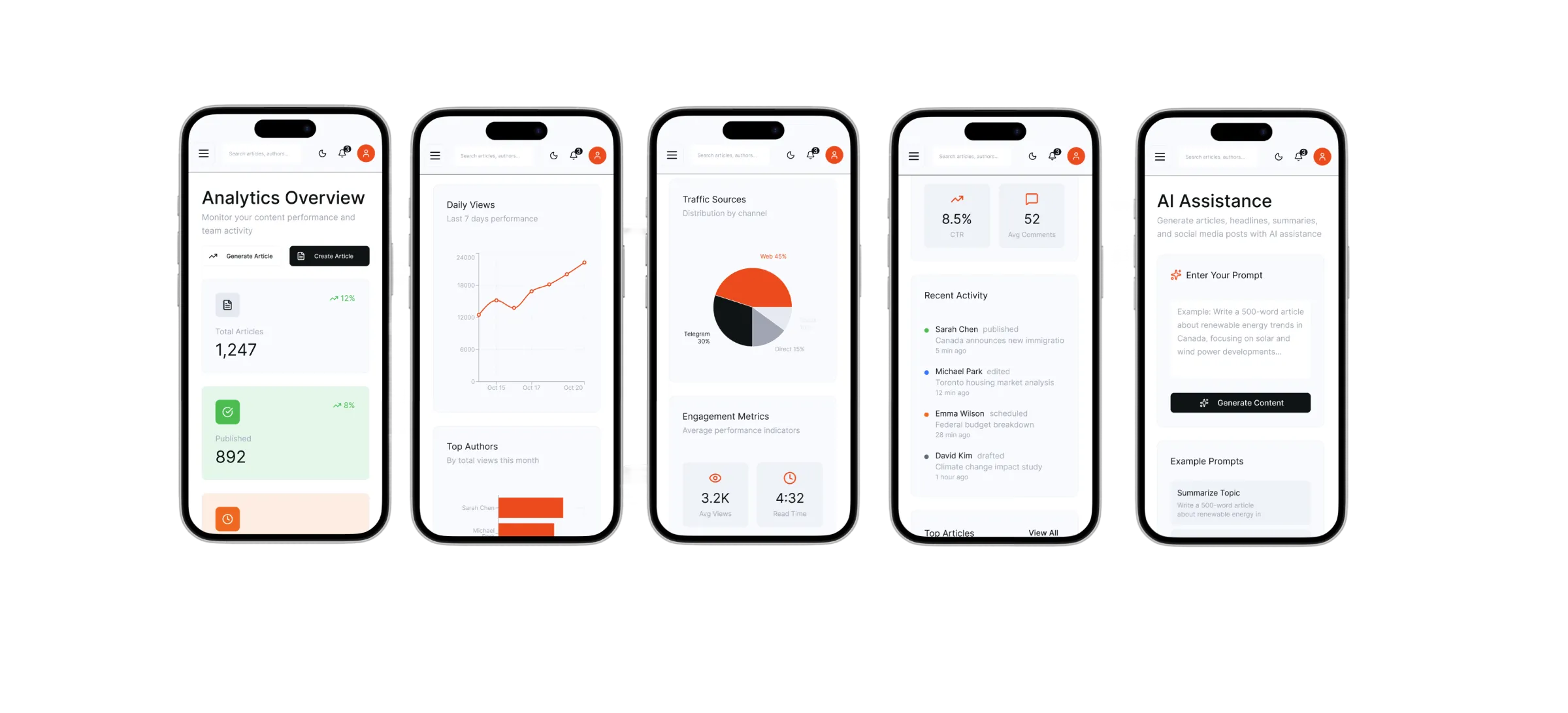
Integrated AI tools support faster workflows by generating article summaries and social posts, helping teams maintain consistency while reducing manual effort.
3. Advanced Search, Analytics & Design Consistency
Powerful search and filtering by title, author, and status combined with real-time engagement analytics, all built on a unified design system shared with the public news website to ensure clarity, scalability, and brand consistency.
Results & Impact
90%
positive feedback
80%
success rate on first attempt
63%
faster task completion
3x
fewer clicks: reduced steps to publish content
Usability testing showed users completed publishing tasks up to 60% faster with the new prototype. The design also reduced complexity by cutting the number of steps in core workflows and helped align the team around a scalable, system-consistent solution.
What I Learned
User needs as a compass
Interviewing editors to uncover pain points in their publishing workflow taught me to ground design decisions in real user needs.
Benchmarking established designs
I realized the value of analyzing industry-standard dashboards to inspire our solution.
Balancing innovation with consistency
Incorporating new features like AI-assisted content tools into a unified design system taught me how to introduce innovation without overwhelming users.
Get in Touch
olga.simonovapro@gmail.com
Social
LinkedIn →
© 2026 Olga Simonova


Web Platform
Dashboard UX Case Study
4 months
2025
TL;DR
- Project Type: Web-based Admin Dashboard for a News & Media Platform
- My Role: Product Designer (research, UX, UI, end-to-end)
- Problem: Editors and administrators lacked a clear, efficient way to manage large volumes of multilingual news content, categories, and publishing workflows, leading to manual work, errors, and low visibility into the content lifecycle.
- Solution: Designed a structured, scalable dashboard that centralizes article management, categories, moderation, and publishing controls, enabling fast, confident editorial decision-making.
- Key Impact: Reduced editorial friction, improved content organization, and supported consistent publishing at scale through clear information hierarchy and task-focused UI.
- Tools & Methods: User and stakeholder interviews, workflow analysis, information architecture, user flows, wireframes, UI design, design system, Figma.
Overview
The InCanadaLife Admin Dashboard was designed as an internal platform to help editors manage articles, streamline publishing, and monitor performance in real time.The goal was to create a clean, intuitive interface that simplifies daily editorial tasks, visualizes key engagement metrics — all within a consistent design system shared with the main news website.
The Problem
As the platform scaled, editorial teams were slowed down by fragmented workflows, manual processes, and limited visibility into the content lifecycle. This made it difficult to publish efficiently, maintain quality, and support multilingual content at scale.
Key challenges included:
- Disconnected tools and manual workflows increasing errors and overhead
- Lack of clear article status, ownership, and publishing visibility
- Difficulty scaling content operations
Discovery & Research
Interviewed editors and contributors to identify pain points in publishing workflow.
Defined use cases: “Create & Publish Article”, “Generate Post”, “Track Performance”.
Based on the research insights, a clear user flow was designed to map how Admins, Editors, and Contributors move through the InCanadaLife Admin Dashboard—from content creation and review to publishing and performance tracking, ensuring an efficient, transparent, and role-based workflow.
Solution: Key Features
1. Role-Based Content Management
A clean, structured dashboard tailored to Admins, Editors, and Contributors, enabling efficient creation, editing, scheduling, and publishing of articles with clear ownership and status visibility.
2. AI-Assisted Content Creation
Integrated AI tools support faster workflows by generating article summaries and social posts, helping teams maintain consistency while reducing manual effort.
3. Advanced Search, Analytics & Design Consistency
Powerful search and filtering by title, author, and status combined with real-time engagement analytics, all built on a unified design system shared with the public news website to ensure clarity, scalability, and brand consistency.
Results & Impact
90%
positive feedback
80%
success rate on first attempt
63%
faster task completion
3x
fewer clicks: reduced steps to publish content
Usability testing showed users completed publishing tasks up to 60% faster with the new prototype. The design also reduced complexity by cutting the number of steps in core workflows and helped align the team around a scalable, system-consistent solution.
What I Learned
User needs as a compass
Interviewing editors to uncover pain points in their publishing workflow taught me to ground design decisions in real user needs.
Benchmarking established designs
I realized the value of analyzing industry-standard dashboards to inspire our solution.
Balancing innovation with consistency
Incorporating new features like AI-assisted content tools into a unified design system taught me how to introduce innovation without overwhelming users.
Get in Touch
olga.simonovapro@gmail.com
Social
LinkedIn →
© 2026 Olga Simonova. All rights reserved.


